Online shift scheduling without spreadsheets or chat chaos and manual busywork
Build schedules, track actual hours, and publish updates to your team. ShiftBox keeps rotating operations under control in one interface.
0/7
access to the team schedule
0 min
to publish a shift change
0 clicks
to bulk-edit shifts
Built for teams where the schedule changes every week
ShiftBox fits teams with multiple roles, flexible patterns, and frequent substitutions.
RestaurantsRetailClinicsPickup points & warehousesService teams
Product UI
Open live demo See ShiftBox in real workflows
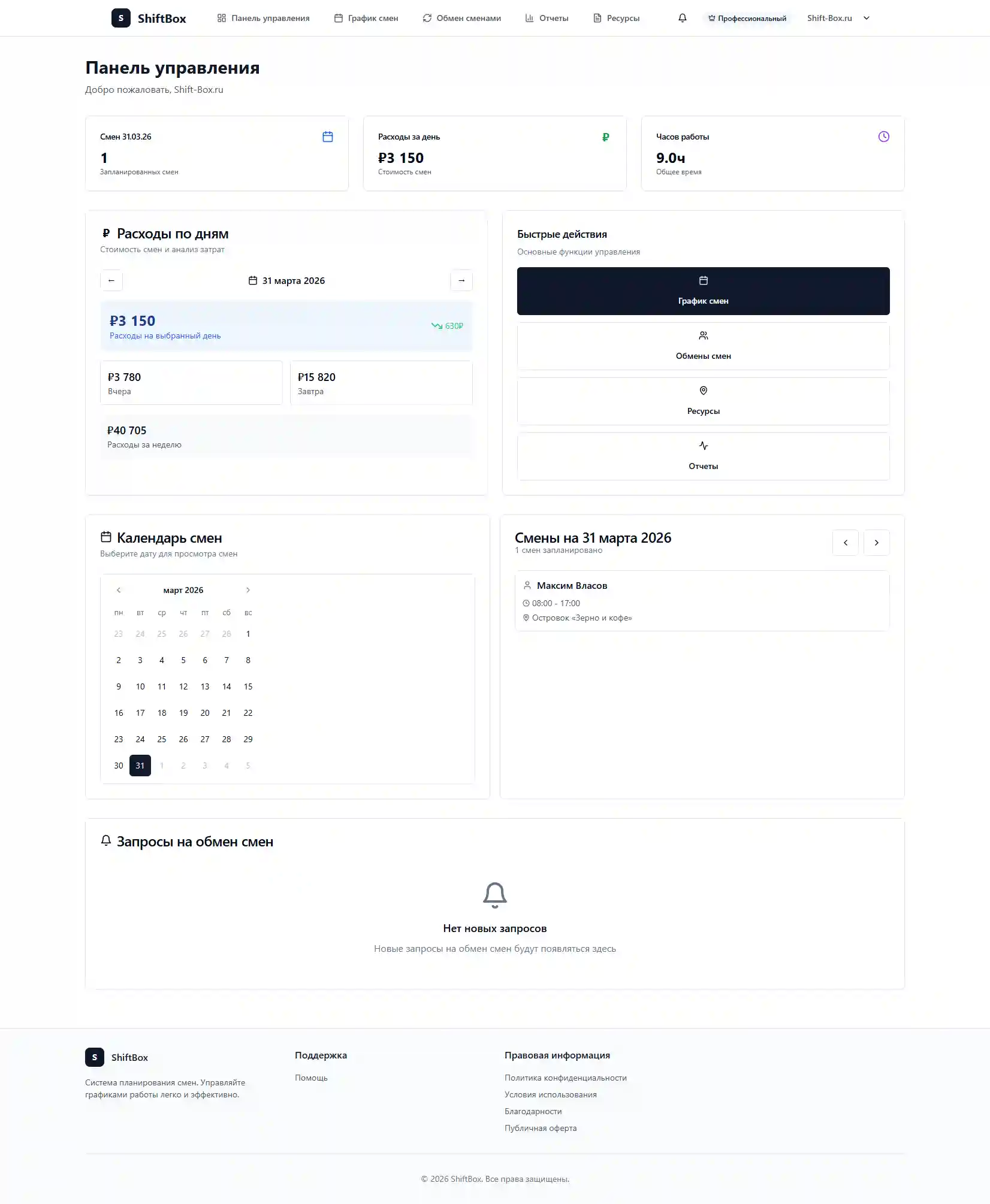
Three quick scenarios: planning shifts, tracking hours, and team collaboration.
Workflow
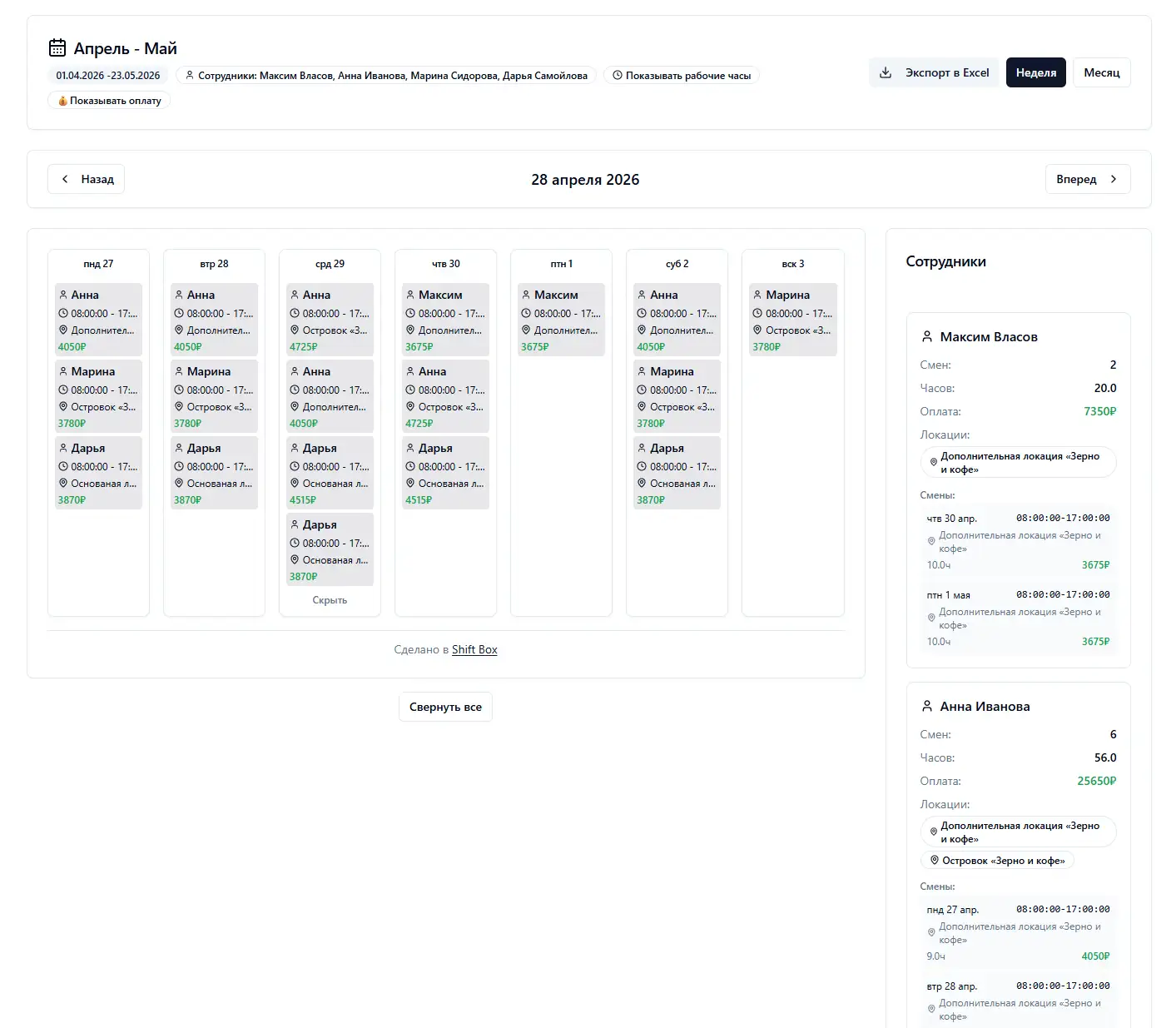
Build a shift schedule in minutes
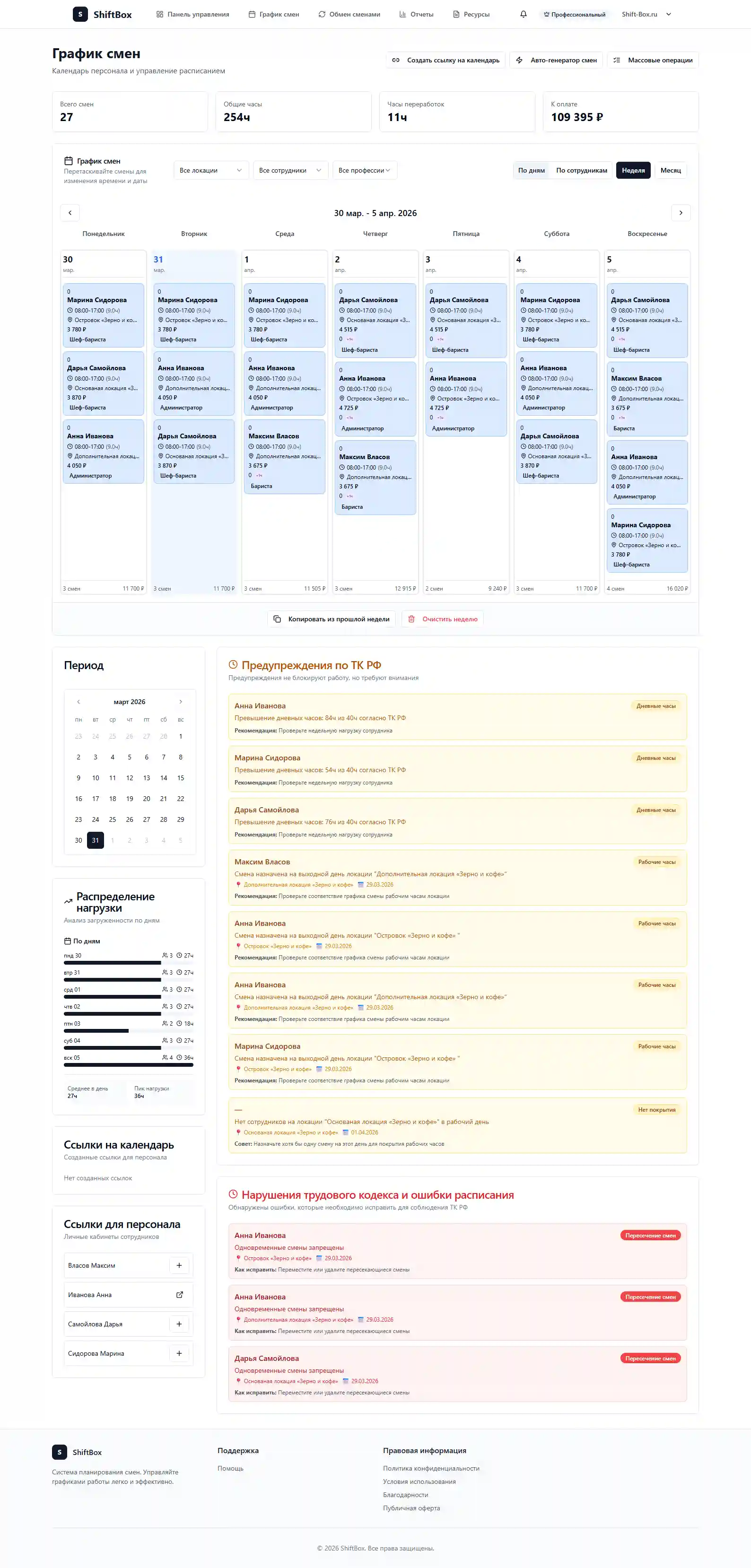
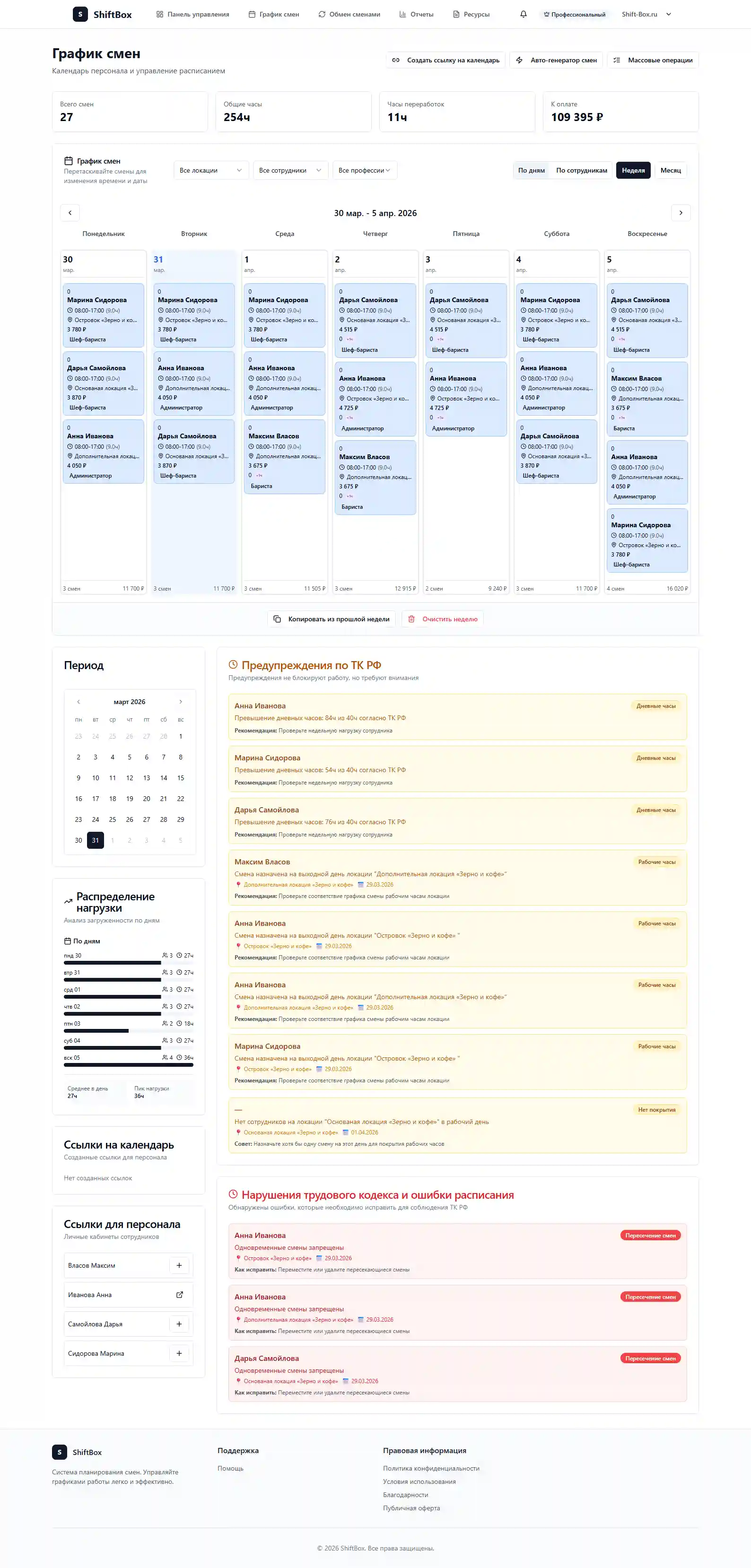
A weekly matrix with roles and sites, drag-and-drop moves, and bulk edits. Spot overloads and coverage gaps, then publish for the team.
weekly matrixdrag-and-dropbulk edits
Workflow
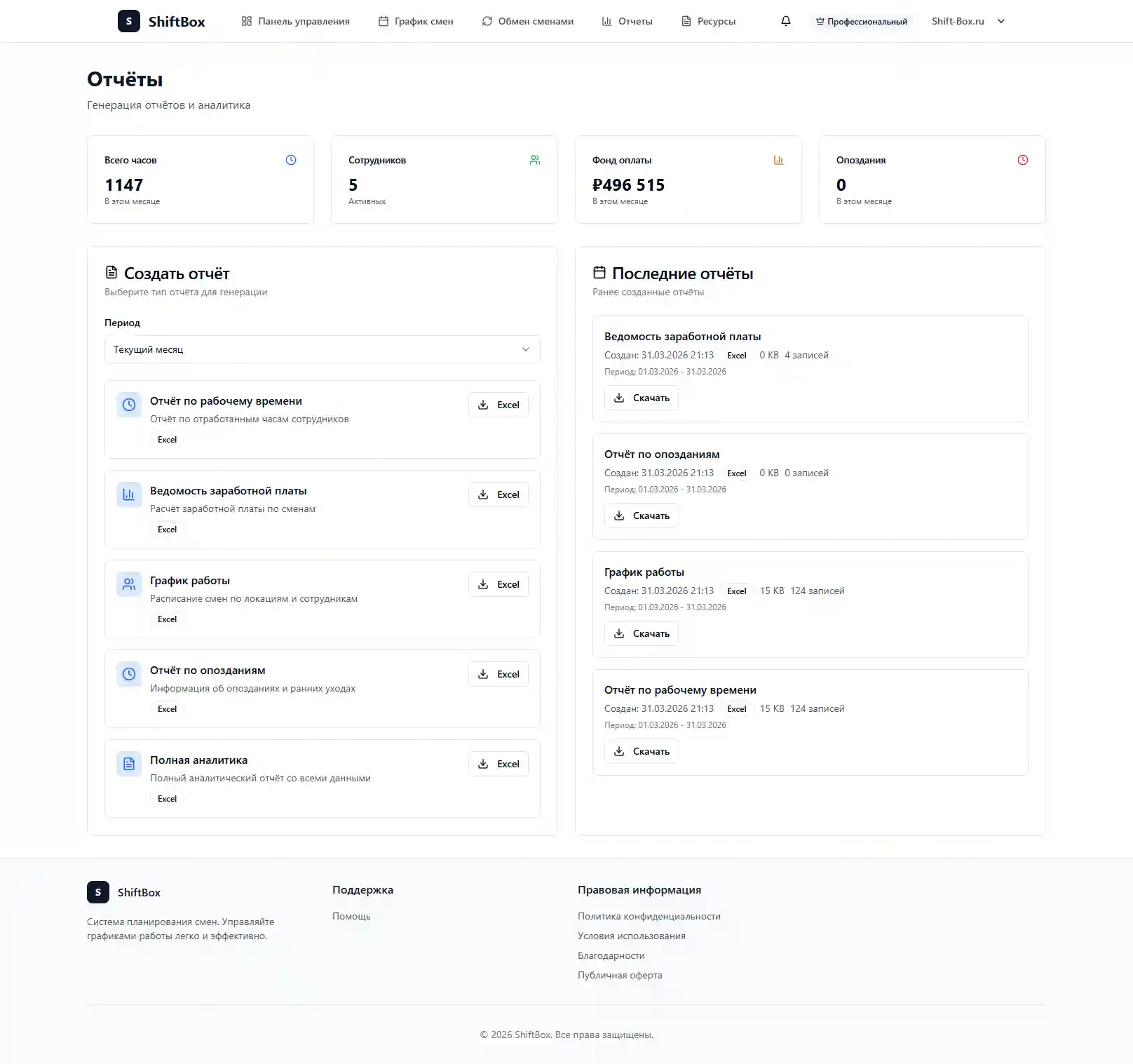
Track actual hours and overtime
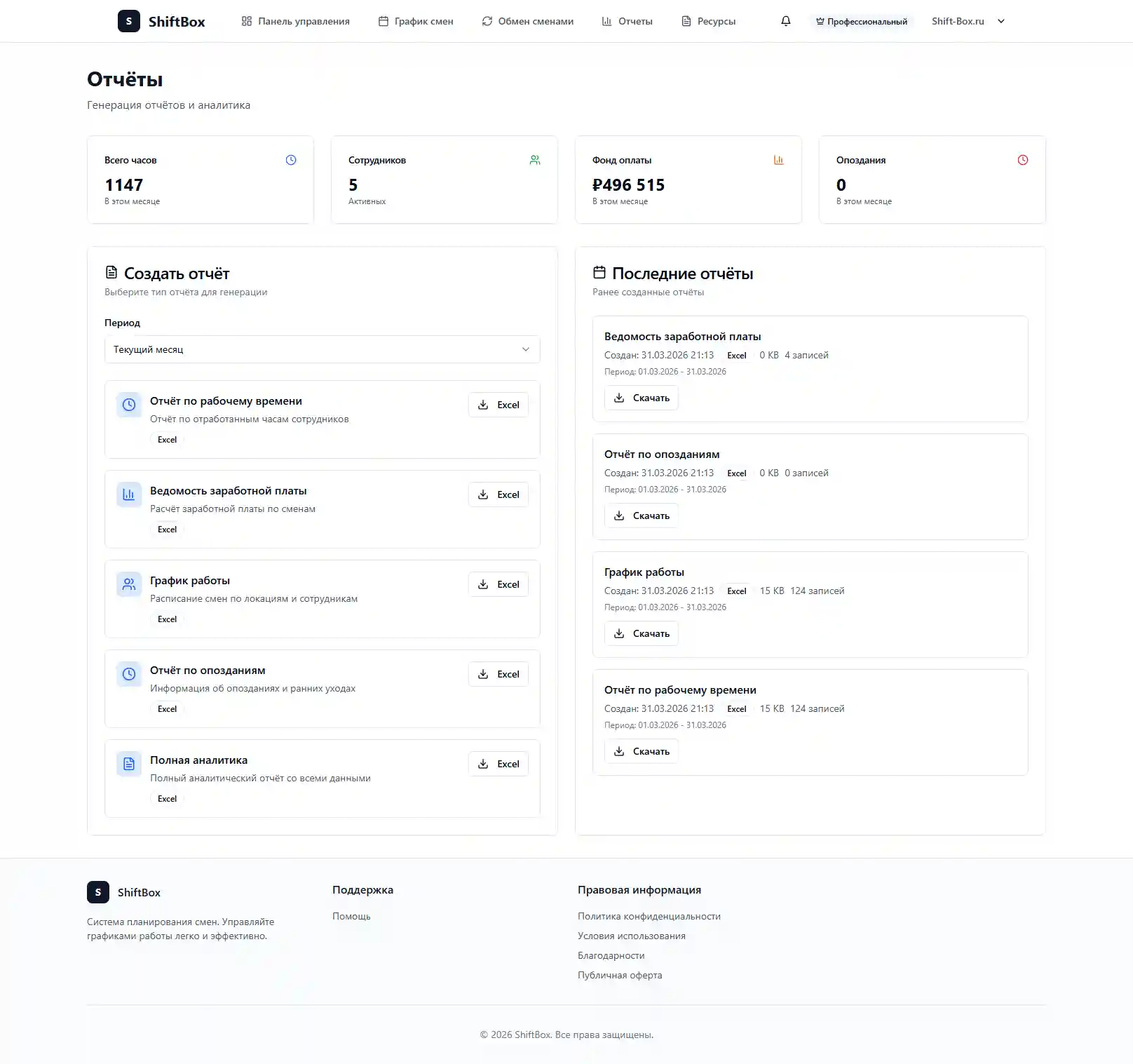
Time tracking and timesheet views: actual hours per shift, exceptions (late, early leave, overtime), and payroll-ready summaries.
actual hoursexceptionspayroll-ready
Workflow
How staff see shifts and respond
Employee workspace with schedule, notifications, and confirmations. Swap requests stay in the system so everyone shares one live plan.
employee portalnotificationsshift swaps
Capabilities
From a first draft schedule to a ready timesheet
ShiftBox covers daily manager work: scheduling, conflict checks, time tracking, swaps, and team communication as one clear process.
Core workflow
Build the schedule and immediately see overload risk
Managers can assemble shifts, spot conflicts, and publish a final plan without Excel, calls, or endless follow-ups.
Drag-and-drop shift planning
Bulk edits by people, roles, and locations
Passwordless employee access
Shift swaps with manager approval
Time control with a clear timesheet trail

Bulk shift editing
Move and update dozens of shifts in a few clicks when plans change at the last minute.
Catch issues before publishing
Conflicts are highlighted early so managers avoid mistakes in the final schedule.
Reporting for decisions
Shift data, actual hours, and workload help you plan staffing and payroll more accurately.
Schedule, timesheet, swaps
One manager workspace instead of three disconnected tools.
Changes reach the team fast
Workspace plus notifications help everyone see the latest plan.
Built for rotating teams
Hospitality, retail, clinics, warehouses, and service teams with live schedules.
How it feels day to day
Everything for shift operations in one calm interface
This section mirrors the full manager workflow—from building the schedule to publishing shifts and reconciling actual time.
Outcome for the team
Managers move faster, and staff always see the latest shifts.
- One workflow instead of spreadsheets, chats, and side notes.
- Fast edits for managers and a clear view for the team.
- Less manual busywork, more control over rotating operations.
01Planning
A schedule grid without visual noise
Build shifts in a clear matrix calendar, assign people with drag-and-drop, and immediately see coverage gaps.
drag-and-drop shiftsfilters by role and siteconflict checks
02Time control
Timesheets you can trust
Actual hours, lateness, and overtime live in one place so managers are not reconciling spreadsheets at month-end.
ready timesheet viewslateness & overtimepayroll-ready summaries
03Team
A lightweight employee workspace
Staff open a browser link, see their shifts, mark unavailability, and request swaps without a heavy onboarding flow.
no extra apps requiredunavailability marksshift swaps
04Communication
Updates without chat ping-pong
When shifts change, people see the new plan in their workspace—managers do not re-explain every edit in side threads.
publish in one stepclear what changedfewer manual follow-ups
How it works
Turn spreadsheet + chat chaos into one calm workflow
Collect shifts and roles in one place, edit in minutes, then give the team a clear published plan.
What changes for managers
Instead of explaining every edit, you get a predictable repeatable process.
Especially when people, roles, sites, or hours change often.
01
Build
Plan shifts in one workspace
Plan by people, roles, and sites without endless file versions.
02
Edit
Update the schedule in minutes
Move, replace, and update shifts in bulk when reality changes overnight.
03
Publish
Share the final plan with the team
Publishing plus notifications replaces manual explanations for every change.
Pricing
Clear pricing without clutter or hidden surprises
Start free, test with your team, and upgrade when you need more automation, headcount, and controls.
Starter
Try the product on a real scenario
Free
Free trial
- Validate the UI on your case
- Schedule + team in one place
- No card required
Team
For day-to-day shift operations
$0 /mo
per month (Team)
- Schedule, timesheet, workspace
- Notifications and swaps
- Hours and overtime control
Growth
For multi-site teams with more roles
$0 /mo
per month (Growth)
- Up to 50 employees
- Advanced reporting
- Priority support
Why teams leave Excel
Why teams pick ShiftBox over spreadsheets and endless chats
Not because you need another tool—but because you need one process for schedule, time, and communication.
What the team gains after switching
ShiftBox brings schedule, actual time, and communication into one system. Moving off Excel feels like switching from scattered tasks to a daily routine.
“Managers work in one window, and the team always sees the latest shifts without manual forwarding.”
Transparency
Schedule, hours, and changes stay synchronized in one place.
Speed
Bulk edits and publishing take minutes.
One source of truth for shifts
Schedules no longer get lost between chats, calls, and spreadsheet versions.
- - Managers see the live plan
- - Less confusion for staff
Timesheets without manual reconciliation
Actual hours, lateness, and overtime live in one system and are ready for payroll prep.
- - Facts at your fingertips
- - Clearer conversations with the team
Teams react faster to changes
Staff see updates, mark unavailability, and request swaps without screenshot ping-pong.
- - Workspace + notifications
- - Fewer missed changes
FAQ
Common questions about ShiftBox
What teams usually ask before moving off spreadsheets and manual planning.
How is ShiftBox better than Excel for shift schedules?
Spreadsheets require manual entry, rarely prevent scheduling conflicts, and do not notify your team automatically. ShiftBox combines shift planning, time tracking, notifications, and swaps in one interface.
How does ShiftBox help track lateness and attendance issues?
Actual hours, exceptions, and overtime are collected in one place. Managers see shift-level visibility and can respond faster when the schedule breaks.
Does ShiftBox work for multiple locations and roles?
Yes. It fits retail, hospitality, clinics, warehouses, pickup points, and service teams where you have multiple roles, sites, and frequent substitutions.
Do employees need to install an app?
No. Employees can open a browser workspace on their phone, see their shifts, and respond to changes without installing a separate app.
How long does it take to get started?
Most teams can start in minutes to a business day, depending on size. Add employees, roles, and locations, build your first schedule, and iterate faster from there.
Can we publish schedule changes without calls and screenshots?
Yes. After publishing, employees see the latest shifts in their workspace, and notifications help them catch swaps, moves, and new assignments.
Can we use different access levels for managers and staff?
Yes. Managers keep operational control while staff only see what they need: their shifts, availability, and allowed actions.
Is ShiftBox a good fit if our schedule changes almost every day?
Yes. ShiftBox is built for frequent swaps, overtime, coverage gaps, and last-minute edits—without losing the single source of truth.
Start without spreadsheets
See how ShiftBox fits your real shift schedule
Open the demo or start a free trial to validate the UI on your sites, roles, and shift types—without a heavy rollout.
Schedule Timesheet Notifications
Tools
Browse all tools Free calculators and generators you can use today
Use free tools to estimate staffing, build shift grids, calculate overtime, and plan vacations without manual formulas.
Excel & PDF
Shift schedule generator
Create a clean 2/2 or 5/2 schedule for your team in minutes.
Open
Per shift Staffing calculator
Estimate how many people you really need per shift and at peak hours.
Open
Event Public event schedule
Create an event calendar for volunteers, festivals, or ops teams and share a public page.
Open
Industries & shift patterns
Ready-made scenarios and industry pages
Pick a schedule pattern, task, or industry. Each page explains a scenario and how ShiftBox solves it in practice.
2/2 rotating shifts 3/3 shift scheduling 4/2 shift rosters 5/2 work cycles 1/3 shift pattern software DuPont shift schedule Pitman 2-2-3 shift schedule Shift work scheduling and operations Night shift scheduling and coverage Restaurant shift schedules Coffee shop & bakery shift schedules Retail shift schedules for stores Pickup point (PVZ) shift schedules Medical and care shift scheduling Veterinary clinic scheduling for surgeons, vet techs & kennel Beauty salon shift schedules Construction crew shift scheduling Security & guarding shift schedules Overtime control for shift teams Shift-based payroll preparation Workforce budget planning with shift visibility 4/10 work schedule 9/80 compressed work schedule Call center shift scheduling and SLA coverage Dog daycare shift scheduling for kennels & play yards Flexible shift schedules for variable demand Hotel staff scheduling for housekeeping, front desk & ops Job shop scheduling for small-batch manufacturing Summarized working time accounting (SURV) Volunteer & church shift scheduling Warehouse shift scheduling for logistics teams